Showing posts with label computer network FAQs. Show all posts
OSI reference model

OSI reference model

OSI Reference Model

What is the simplest explanation of the OSI model involving real examples?

  • OSI long from is open loop system interconnection.
  • It is developed by International Standard Organization (ISO) in 1970.
  • OSI reference model has 7 layers.
  • Physical (layer 1), Data link (layer 2), Network (layer 3), Transport (layer 4), Session (layer 5), Presentation (layer 6), Application (layer 7).
  • Below mention the functions that occur at each layer of the OSI model.
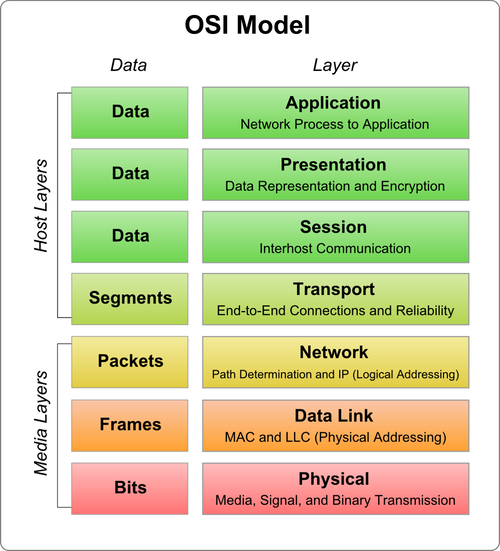
OSI reference model
OSI reference model

Application layer:

  • The application layer of the OSI model marks the spot where user actually communicate or interact with the computer.
  • User application is in any form like file, print, images, messages, database, and application services.
  • Data an application layer is in original from.

Presentation layer:

The Presentation layer gets its name from its purpose it present data to the application layer and is responsible for data translation and code formatting. A successful data transfer technique is to adapt the data into a standard format before transmission.
Computer are configured to receive this generically formatted data and then converted it back into its native format for reading for exam, from EBCDIC to ASCII. By providing translation services, the presentation layer ensures that the data transferred from one system. Application layer can be read and understood by application layer on another’s.
The OSI has protocol standards that define how the data should be formatted task like data compression, decompression, encryption, and decryption are all associated with this layer. Presentation layer standards are even involved in multimedia operation.
  • Presentation layer perform data encryption at sender side and decryption done at receiving side .
  • It is an user interface layer user can do compression of data at sender side and decompression was happened at receiver side.
  • User can mange data in appropriate from.
  • Data an presentation layer is in bit from.

Session layer:

The Session layer is responsible for setting up, managing, and then tearing down sessions between between presentation layer entities. This layer also provides dialog control between devices, or nodes. It coordinates communication between systems and servers to organize their communication by offering three different mods: simplex, half duplex, full duplex. To sum up, the session layer basically keeps applications data separate from other application data,
  • Session layer perform flow control of data.
  • Session layer provide session management.
  • Session layer also mange header size.
  • Session layer also main tented data and time user sending and receiving data.

Transport layer:

The Transport layer segments and reassembles data into stream. Services located in the transport layer handle from upper layer application and unite it onto the same data stream. They provide end to end data transport services and can establish a logical connection between the sending host and destination host on an internetwork,
The Transport layer the sending host for providing the mechanisms for multiplexing upper layer application, establishing virtual connections, and tearing down virtual circuits. It also hides the many and sundry details of any network dependent information from the higher layer facilitating data transfer.
  • Transport layer convert the bit into segment.
  • It assign the sequencing to the every segment.
  • It also done port addressing.
  • It perform connection management.
  • UDP and TCP is used for connection management.

Network layer:

  •  It routes the signal through different channels from one node to other.
  •  It acts as a network controller. It manages the Subnet traffic.
  •  It decides by which route data should take.
  •  It divides the outgoing messages into packets and assembles the incoming packets into messages for higher levels.

Data link layer:

  • Data link layer synchronizes the information which is to be transmitted over the physical layer.
  • The main function of this layer is to make sure data transfer is error free from one node to another, over the physical layer.
  •  Transmitting and receiving data frames sequentially is managed by this layer.
  •  This layer sends and expects acknowledgements for frames received and sent respectively. Resending of non-acknowledgement received frames is also handled by this layer.
  •  This layer establishes a logical layer between two nodes and also manages the Frame traffic control over the network. It signals the transmitting node to stop, when the frame buffers are full.

Physical layer:


  •  Big picture of communication over network is understandable through this  OSI model.
  •  We see how hardware and software work together.
  •  We can understand new technologies as they are developed.
  •  Troubleshooting is easier by separate networks.
  •  Can be used to compare basic functional relationships on different networks.

Read More
Types of WAN Connections

Types of WAN Connections

Types of WAN Connections

What is the types of WAN connections?

There are two main types of WAN connections.
  • Dedicated Connection 
  • Switched Connection
Types of WAN connection


Dedicated Connections

In computer networks and telecommunications, a dedicated line is a communications medium or other facility dedicated to a specific application, in contrast with a shared resource such as the telephone network or the Internet is called dedicated connection.

1.Leased Lines:


  • It is a dedicated point to point connection which provides pre-establish WAN communication path through ISP to remote destination is called as leased line.
  • It provide very high speed data transmission up to 64Gbps.
  • It is very expensive.

2.Digital Subscriber Line (DSL):

  • It is a provide connection between ISP to a customer through telephone line.
  • It is a broadband technique which provides same upstream and downstream.

3. Asymmetric Digital Subscriber Line (ADSL): 

  • Asymmetric digital subscriber line is type of digital subscriber line technology a data communication technology that enables faster data transmission over the copper telephone line rather than conventional voice modem used. 
  • It is some like as digital subscriber line but only difference is that upstream and downstream are different. 

Switched Connections

There are three types of switched connection are as follows.
  1. Circuit Switched Network.
  2. Packet Switched Network.
  3. Cell Switched Network.

1. Circuit Switched Network:

  • In circuit switches network every time before transferring data over the WAN, new connection get establish after data transfer over the connection get closed.
  • In this technique generally data is transferred through single connection or single route.

2. Packet Switched Network:

  • In packet switched network uses virtual connection for transferring data, it for transferring data create connection on first data transmission and used it as a permanent connection.
  • It is faster than circuit switched network.
  • It is used for multi path communication.

3. Cell Switched Network: 

  • In this type of network data transfer in fixed size cell that is 53 bytes.
  • Its example as ATM.
      
Read More
WAN Terminology

WAN Terminology

WAN Terminology

What is WAN Terminology?


WAN Terminology
WAN Terminology

1. Data Communication Equipment (DCE)

     This are the equipment which receive data from one device or transfer to another device is called data communication equipment.
 ex: Router, Bridge, Switches etc.

2. Data Terminal Equipment (DTE) 

   These are the device terminates the data communication is called as data terminal equipment.
  ex: End devices like router.

3. Customer Premises Equipment (CPE)

  These are the devices which are connected with customer premises is called customer premises equipment.
  ex: Bridge, Switches.

4. Channel Service Unit/Data Service Unit (CSU/DSU)

   It is used for digital line and used for modulation and demodulation is called channel service unit.

5. Demarcation Point

   It is boundary or boarder between customer premises equipment (CPE) and internet service provider (ISP) is called demarcation point.

6. Toll network

   It is also called as service provider network. When data exchange is done for multiple line is called toll network.

7. Local Loop

   It is interface or link used to connect channel service unit (CSU) and data service unit (DSU) to internet service provider is called local loop.

8. co switch (central office switch)

  This are switch used for exchanging data in toll network is called co switch.


Read More
How do I use internet on mobile by cable modem?

How do I use internet on mobile by cable modem?

How do I use internet on mobile by cable modem?

 Firstly you required router for wireless connection and then after follow this process.
  • Connect the "WAN port" of your wireless router to the cable modem. Typically the router must be configured to get its IP address using DHCP, but this depends upon your cable provider. If you have trouble with this part, ask your cable company how to connect a broadband router to your cable modem.
  • Connect the Wi-Fi card in your Fujitsu laptop to your wireless router using 802.11g. Follow instructions that came with your card and router -- typically you need to configure the same SSID (network name) and WEP keys in both the card and the router. When configuring WEP keys, watch out for differences between hex and ASCII. (Some products require keys to be entered in hex, others in ASCII, so be sure you follow instructions supplied with your card and router.) Try to connect the card without WEP enabled, then add WEP when the connection is working.
  • Connect the desktop to the your wireless router. Most wireless routers have built-in 4-port Ethernet hubs which let you connect an Ethernet card in your desktop directly to the router. If your wireless router does not have any LAN Ethernet ports, or your desktop doesn't have an Ethernet card, then you'll need a Wi-Fi adapter for your desktop. Most people find it more convenient to use USB Wi-Fi adapters in desktops, Wi-Fi PCI cards are also an option.
  • Most wireless routers default to give out LAN IP addresses with DHCP, so configure both the laptop and desktop to get IP addresses automatically from the router. Most wireless routers also default to using network address translation (NAT) to share one Internet connection across many WLAN stations, so you probably won't have to configure anything else in the router to make this all work.


Read More
What are the functionalities of the session layer of the OSI model? How does it compare to the network layer?

What are the functionalities of the session layer of the OSI model? How does it compare to the network layer?

What are the functionalities of the session layer of the OSI model? How does it compare to the network layer?

What are the functionalities of the session layer of the OSI model? How does it compare to the network layer?

Session layer:

Session layer is upper layer of OSI reference model, Its main aim is to establish, maintain and synchronize the interaction between communicating systems. Session layer manages and synchronize the conversation between two different applications. Transfer of data from one destination to another session layer streams of data are marked and are resynchronized properly, so that the ends of the messages are not cut prematurely and data loss is avoided.
session layer also manege flow control, header size, time to leave(TTL).

1.Dialog Control : **This layer allows two systems to start communication with each other in half-duplex or full-duplex.

2.Synchronization : **This layer allows a process to add checkpoints which are considered as synchronization points into stream of data. Example: If a system is sending a file of 800 pages, adding checkpoints after every 50 pages is recommended. This ensures that 50 page unit is successfully received and acknowledged. This is beneficial at the time of crash as if a crash happens at page number 110; there is no need to retransmit 1 to100 pages.


Network layer:


  •  Network layer perform routing(selecting based root for data transmission is called routing).
  •  Subnet traffic control: routers (network layer intermediate systems) can instruct a sending station to "throttle back" its frame transmission when the router's buffer fills up.
  •  Frame fragmentation: if it determines that a downstream router's maximum transmission unit (MTU) size is less than the frame size, a router can fragment a frame for transmission and re-assembly at the destination station.
  •  Logical-physical address mapping: translates logical addresses, or names, into physical addresses.
  • Subnet usage accounting: has accounting functions to keep track of frames forwarded by subnet intermediate systems, to produce billing information.


Read More